
More Than Just Prompts: How MCP Expands the Capabilities of Automic Automation.AI
Similar to traditional automation, access to external data and solutions is essential for using Automic AI. To this end, the MCP (Model Context Protocol) has quickly become a widely adopted open standard. The technical approach is similar to that of web services: here, too, services are provided for other solutions.
The services provided by MCP can both deliver and modify data. In addition, after Automation.AI is configured, an MCP communicates a list of its capabilities. Thus, every newly added MCP expands the capabilities of Automation.AI.
This image (GERMAN) shows the architecture of an MCP server.
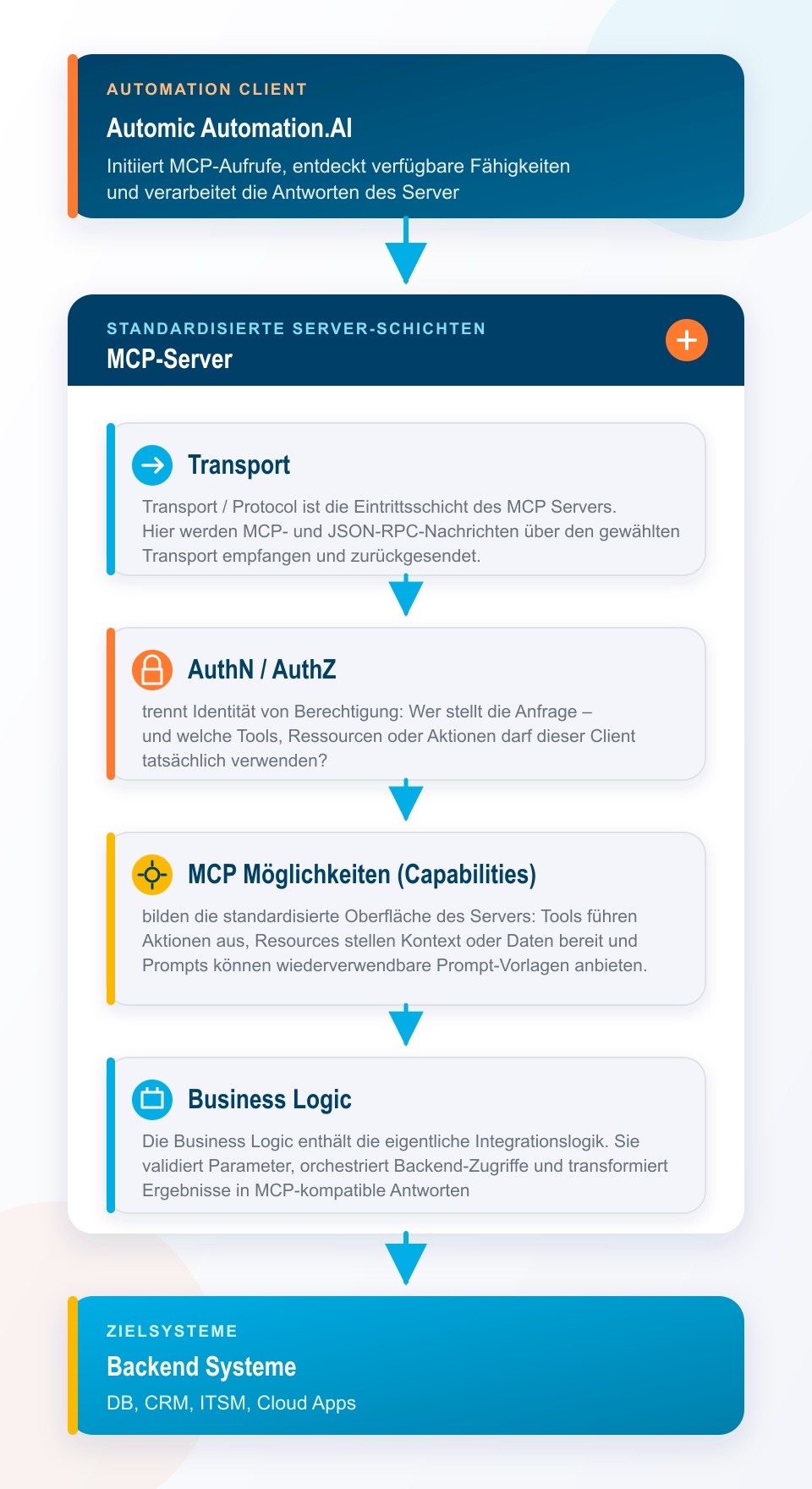
The MCP capabilities described in the figure can be implemented in three different ways:
Tools
perform actions and also allow the definition of input parameters.
create_ticket(...)
Ressources
provide addressable information.
invoice://2026/12345
Prompts
provide server-side prompt and workflow templates.
summarize_customer
“Tools” are particularly well-suited for practical use in Automic. Ultimately, however, this is irrelevant, since an MCP tells Automation.AI how to access a service.
Automation.AI can provide external functions in two fundamentally different ways. An existing REST API can be automatically translated into MCP tools via an OpenAPI provider. Alternatively, Automation.AI can establish a connection to a real MCP server. STDIO, SSE, and Streamable HTTP are supported for such MCP connections.
automation.ai.mcp.openapi
This variant communicates with the MCP via HTTP. It allows you to specify which of the tools provided by the MCP can be used. This makes this variant the preferred choice. Unfortunately, I couldn’t find a way to configure authentication using bearer tokens. Incidentally, this variant is also used for the Automic MCP integration.
spring.ai.mcp.client.streamable-http.connections
The “streamable-http” variant allows authentication via bearer tokens. However, there is no documentation on how to restrict the tools provided by the MCP. I hope that future versions of Automation.AI will include a feature to do so.
spring.ai.mcp.client.stdio.connections
In the third variant, it is launched directly by Automation.AI. For this to work, the MCP and Automation.AI must be located on the same machine. This MCP type is called “STDIO” because communication between Automation.AI and the MCP takes place via “stdio,” i.e., locally. Even though it is technically possible to connect agent-based AI assistants such as Claude Code in this way, this should be avoided because the AI assistant inherits the operating system permissions of the Automation.AI process. Especially for tools that can modify files or launch programs, this account should therefore have the most restrictive permissions possible.
To configure the MCPs in `application.properties`, I used one of the well-known AI providers. It’s helpful to mention in the prompt that this is a connection to Spring.AI in the Automation.AI context. I also attached a sample `application.properties` file to my prompt. This provided me with the necessary configuration properties. The application.properties file also includes some helpful examples.
After the MCP has been configured in the application.properties file, the Automation.AI component must be restarted for the configuration to take effect.
After the restart, check the automation-ai.log file in the ‘logs’ directory to verify that the new MCP has registered successfully.
The MCP’s functions are now available to Automation.AI and can be used for automation.
To use the new MCP, you must first define an AI Connection object. This allows you to select the MCP and its exported tools. The Connection object thus provides the ability to deliberately restrict AI jobs’ access to MCP tools. It makes sense to define different connection objects for individual use cases, since an analysis job can only access data-providing tools, such as getReport or listExecutions.
AI prompts are defined by the AI job type. This is where the user prompt and the system prompt are defined, and the AI connection object is stored.
The system prompt is used to describe the role the AI job is intended to play. This influences the style and scope of the AI’s response. Responses for an administrator tend to be more technically detailed than those for a business user, since the latter is more interested in a solution than in the technical details.
There are two other properties of interest within the AI job. The “Conversation Settings” determine whether the request is a standalone one or whether it marks the beginning of—or is part of—a conversation. Within a conversation, the results of the previous AI request are reused. To do this, the first AI job generates a Conversation ID and stores it in an Automic variable. This ID is then passed on to the subsequent job as needed.
Using the AI Output property, you can assign the result of the query to an Automic variable. This is a nice convenience feature. However, a REP report is also generated in the traditional way, and pre- and post-scripts remain available for pre- and post-processing.
When defining the connection object within the AI jobs, there is another option to limit the list of available MCP tools.
This completes the AI job, since nothing needs to be entered under Job Attributes.
Finally, a few words on the structure of AI prompts. An AI job consists of a system prompt and a user prompt. The system prompt should describe the job’s basic role, rules, and limitations. Here, for example, you can specify which tasks the AI is allowed to perform, what it should not do, and how it should handle ambiguous situations.
The user prompt, on the other hand, describes the specific task for that particular job run and contains the information needed to complete it. Put simply: The system prompt defines the rules of the game, while the user prompt defines the current work assignment.
However, it’s not necessarily true that the more detailed the prompt, the better. Much more important are unambiguous instructions, a clearly defined outcome, and as little room for interpretation as possible. In particular, you should specify the expected output format and what should happen in the event of errors or missing information.
The same applies to the available MCP tools. An AI job should only be given the tools it actually needs to perform its task. Unlike with traditional automation, an AI model can sometimes look left and right. This degree of freedom is certainly intentional, but it must be deliberately limited in productive business processes. After all, reliability and traceability remain more important than creativity in these contexts.
Outlook
In one of my upcoming articles, I will discuss ASK_AI and the AWI’s “Intelligent Assistant.”