
In the age of AI agents, do companies still need UiPath?
Today, an AI agent can generate code, integrations, and initial workflows in an astonishingly short amount of time. This reduces costs and lowers the barriers to entry. However, business automation isn’t complete once the first version is up and running. It must operate securely, transparently, and reliably—even as systems, data, rules, or models change.
The decision of whether to run UiPath-based solutions or those created by AI agents in production environments is therefore not simply a matter of choosing the right tool. The key factors are what needs to be built—and who will be responsible for its operation in the long term.
The direct route through an AI provider
Teams can use coding agents and cloud services to develop their own applications, agents, interfaces, and orchestrations. This is an attractive option when the use case is novel or highly company-specific, solves a clearly defined problem, and an experienced development team can operate the solution. Prototypes and low-risk internal tools can often be tested quickly this way.
The advantage: a high degree of design freedom and a quick start.
The downside becomes apparent in the lifecycle. The company must organize runtime, permissions, monitoring, error handling, restart procedures, logging, testing, documentation, and updates on its own. If APIs, cloud services, or models change, the solution must be reviewed and, if necessary, adapted.
Let’s take the processing of incoming invoices as an example: An in-house AI agent can extract invoice information, verify it, and prepare it for further processing. But what happens if information is missing, an invoice doesn’t match an order, or approval is required? In such cases, additional systems must be integrated, employees must be involved, and decisions must be documented in a traceable manner. This is where an automation platform like UiPath can demonstrate its strengths by combining AI capabilities, traditional automation, and human decision-making within a controlled process.
One should not underestimate the risk that developing many individual solutions will lead to inconsistent standards and make the IT landscape difficult to manage.
UiPath as an execution platform
UiPath is particularly useful when work needs to be reliably orchestrated across multiple systems—for example, using RPA for existing or legacy applications, document understanding for document-based processes, and agent-based capabilities for flexible decision-making. This is typically complemented by human reviews, exceptions, approvals, and traceable process steps.
The added value lies not only in creating the workflow. A platform can provide core components for permissions, deployment, monitoring, auditing, recovery, and operations. This facilitates consistent environments and clear lines of responsibility. This requires platform expertise, governance, and appropriate licensing and operational decisions. UiPath automations must also be tested, documented, and maintained—especially when user interfaces, rules, or interfaces change.
Security is not automatically guaranteed with any approach. Among other things, data flows, storage locations, identity and access management concepts, the handling of inputs and logs, and the approval of model and platform changes must be reviewed. It is important to assign clear business and technical responsibilities: A provider offers capabilities but does not automatically assume responsibility for correct decisions and secure business processes.
When is each approach appropriate?
The following table lists the individual decision criteria and evaluates them.
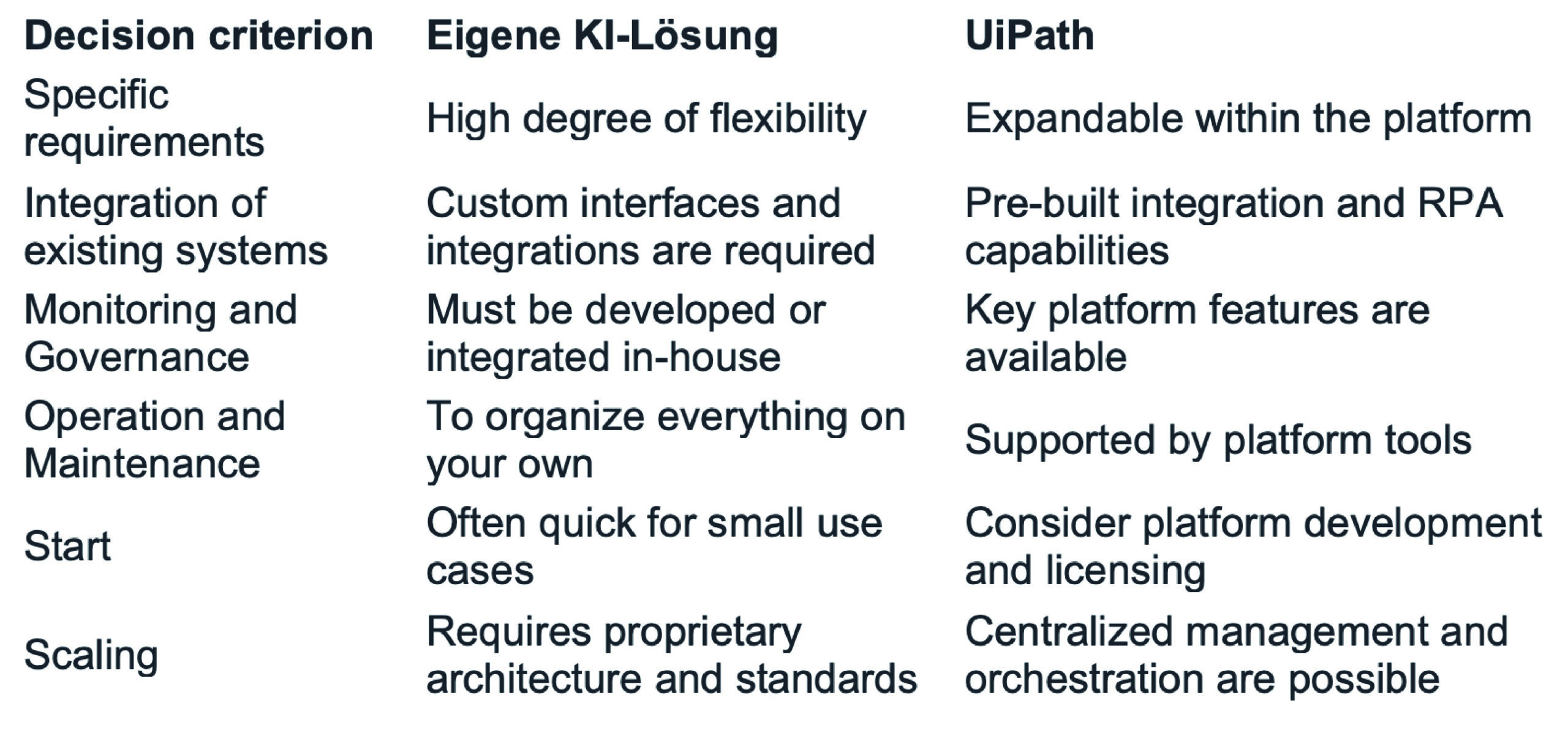
A solution developed directly using AI provider technologies is a good fit when differentiation and rapid adaptability are key priorities, the process is manageable, and a team has a proven track record of handling the entire operation.
UiPath is often the better choice when critical, recurring processes connect multiple applications, involve documents and exceptions, or when auditability, controlled changes, and recovery are important. This is especially true in a legacy IT landscape where not every system offers a modern interface.
What initially appears to be more cost-effective during development may not necessarily be so in the long term. Companies should therefore not only compare the costs of creating an automation solution but also consider the entire lifecycle.
Conclusion
So before you get started, don’t just ask, “How soon can we get a demo?” but also: Who will maintain, update, monitor, document, and be accountable for the solution in two years?
We’ll help you identify suitable use cases and assess when in-house development, traditional automation, or a platform like UiPath is the right approach.
Talk to our automation experts.