

Fewer routine inquiries, more self-service: best-blu and Tricise are combining their Automic offerings
Departments want to request SAP jobs, start automated processes, or view the processing status of their requests. For the Automic team, this often means additional tickets, follow-up questions, and managing access to the Automic Web Interface (AWI). This is exactly where the joint offering from best-blu and Tricise comes in: It connects Tricise Service Tiers with best-blu’s best4Automic Service Portal and Tricise’s 3C Release Manager. Business departments can use approved services on their own, while the Automic team retains control over technical management and access permissions.
best-blu and Tricise have been collaborating for years in the field of business process automation with Automic. With this bundled offering, they are now integrating their services more closely. The goal: to simplify day-to-day operations related to Automic—from usage by business units to the deployment and maintenance of automations.
What is included in each service tier?
The b4A Service Portal complements the Tricise Silver, Gold, and Platinum service tiers. Which edition you receive depends on the tier you select:
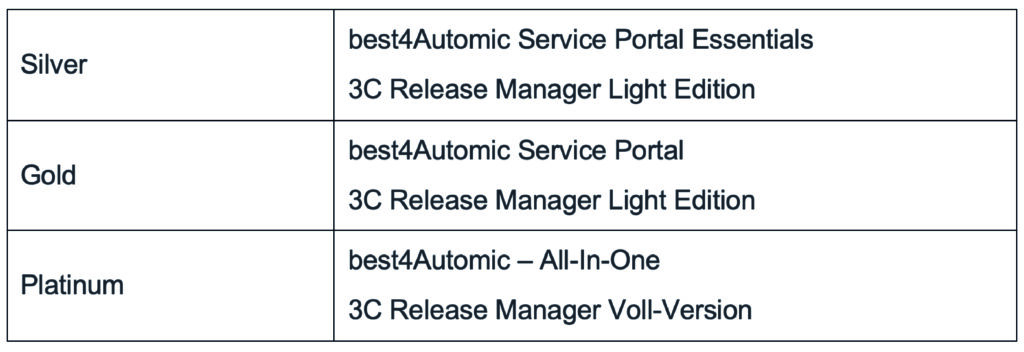
The 3C Release Manager’s structure aligns with the existing bundle model.
The Tricise Service Tiers also represent a more comprehensive service model for Automic customers in the DACH region: ranging from licensing and day-to-day operations to fully managed SaaS in the EU cloud. The services that best suit your needs depend on the service tier you choose. Learn more on the Tricise website.
Self-Service Features for Departments – Oversight by the Automic Team
The b4A Service Portal makes existing Automic automations accessible via a simple interface. Users can find approved services, enter the required data into guided forms, and track the progress of their requests. Depending on their permissions, they can initiate processes, edit tasks, or grant approvals. They do not need their own access to the AWI to do so.
For the Automic team, the main benefit lies in converting recurring requests into defined self-service options:
Less manual intervention: Business users initiate approved workflows themselves, rather than submitting every request to the automation team.
Fewer status inquiries: Business units can view the progress of their tasks directly in the portal.
Business-oriented access instead of a technical interface: Business users do not need to work within the AWI to use the provided services.
- Continued clear control: The Automic team determines which workflows are offered and who is authorized to use them.
The portal does not, therefore, relieve the team of every administrative task. Rather, it creates the foundation for eliminating the need to process standardizable requests on a case-by-case basis. The extent of the workload reduction depends on which services you provide and how frequently they are used.
Reusing Existing Automic Knowledge
You don’t have to start from scratch when implementing your self-service features. The portal is based on Automic: A service is an Automic workflow (JOBP), forms use PromptSets (PRPT), and approvals, notifications, and requests are mapped using CALL objects. Users and permissions are managed in Automic; no additional database is required. This allows you to leverage your existing Automic expertise directly for building and maintaining the services.
Three Examples of How the b4A Service Portal Is Used in Everyday Life
1. Request SAP jobs and have them created automatically
Instead of sending the required information to the Automic team via a ticket, employees request an SAP job using a form. A dedicated Automic workflow processes the request and creates the job object. The team defines the workflow and the valid inputs; business users then use the approved service.
2. Request Permissions for Line-of-Business Applications
A business user selects the required application and role in an easy-to-understand form. The subsequent processing and any necessary approvals are handled through a specially configured Automic process. For the user, the business task takes center stage—not the technical implementation in Automic.
3. Track Long-Running Business Processes
Departments can see in the portal whether a process is still in progress, has been successfully completed, or requires attention. Those who simply need transparency can be granted monitoring-only access through appropriate roles, without being allowed to initiate processes themselves. This can replace follow-up inquiries via ticket or chat.
b4A Essentials or Full Version: What are the differences?
With the Silver Service Tier, you receive the Essentials Edition of the b4A Service Portal to get started with self-service. It includes the ability to start and monitor services, standard input fields, and tasks such as approvals, notifications, and requests. Important for administrators: Categories, services, and roles can only be viewed in Essentials within the portal. You must continue to make changes in AWI.
With the Gold and Platinum service tiers, you receive the full version of the b4A Service Portal. This allows you to manage categories, services, and roles directly in the portal. Additionally, features for more complex forms and workflows are available:
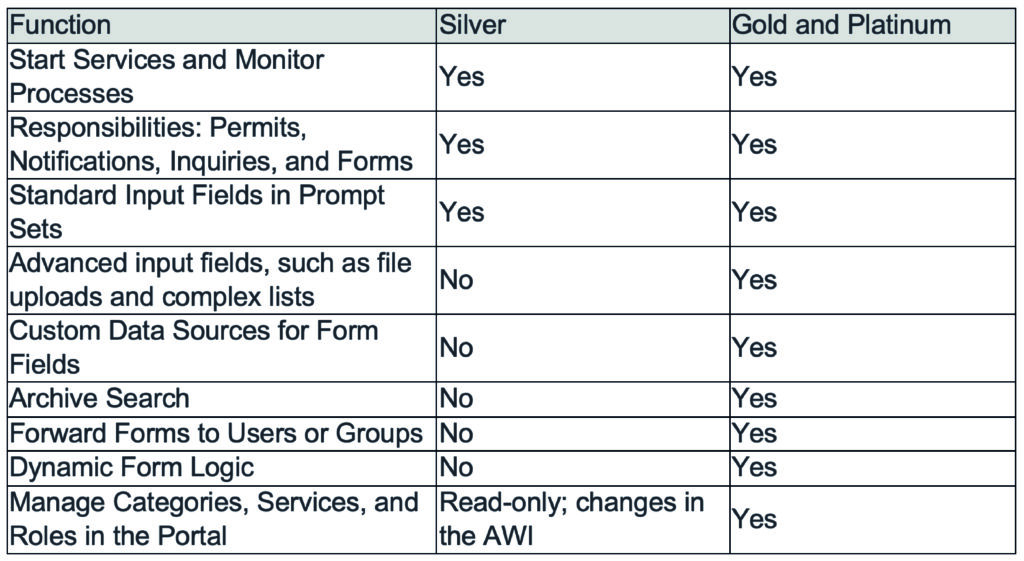
The functional differences are therefore not only relevant to expert users: The full version also shifts the maintenance of the portal structure from the AWI to the portal itself.
You can start with simple services in Essentials and continue using your already implemented services when you later upgrade to the full version.
What else is included in best4Automic All-In-One?
In addition to the b4A Service Portal, over 140 different modules are available to you. They are organized into the categories Information, Transport, Tasks & Executions, Analysis, Bulk Changes, Tools, Package Management, Git Integration, and Test Automation.
The Analysis category, for example, includes modules that collect and evaluate information from the Automic Automation Engine. This allows you to identify objects that are no longer in use and generate reports that go beyond the short time frame covered by the statistical records.
The Mass Change modules enable you to make targeted changes to object definitions across many objects—for example, during migrations—while maintaining traceability of the changes.
The best4Automic Package Management simplifies and structures the entire development process by building and installing objects as b4A packages and automatically documenting them with the Documentation Builder. Optionally, Git integration can also be incorporated here, allowing the packages to be managed as versioned items in a Git repository. Alternatively, test automation can be used to perform automatic regression tests on developed packages.
This allows developers to focus on what they do best: developing new and complex workflows.
The Second Building Block: Transporting Automic Objects Using the 3C Release Manager
While the b4A Service Portal makes it easier for business units to use automations, the 3C Release Manager supports the transport of Automic objects between Automic environments. The product’s feature set includes DIFF, snapshots, and audit logs. The specific features available to you depend on the included edition of the Service Tiers: Silver and Gold include the Light Edition, while Platinum includes the full version.
The two tools thus address different tasks in the same day-to-day Automic workflow: making services accessible to users and transporting the underlying Automic objects between environments. Together with Tricise’s services, this creates an offering that combines tool support and assistance throughout the Automic lifecycle.
Which entry-level position is right for your team?
If you initially want to provide clearly defined self-service options with standard forms and continue to maintain the portal structure in AWI, the Silver service tier with Essentials is a good starting point. If you need advanced forms or want to manage categories, services, and roles directly in the portal, the version included in the Gold and Platinum service tiers is the right choice. When selecting the overall Service Tier, you should also consider the Tricise services you need and the appropriate edition of the 3C Release Manager.
Would you like to find out which recurring requests in your company are suitable for Automic self-service? Talk to best-blu and Tricise about your processes, your administrative requirements, and the appropriate Service Tier.